See it for yourself
Free and interactive, in your browser. No sign-up, nothing to install.
A display failure
The failed screen goes blank. The other shows the flight instruments in the PFD’s layout, with the engine instruments in a strip at its left. Data from the AHRS (attitude and heading reference system), air data computer, engine sensors and transponder moves to backup paths automatically, so you have nothing to press. ENGINE, the first softkey, opens the engine pages.
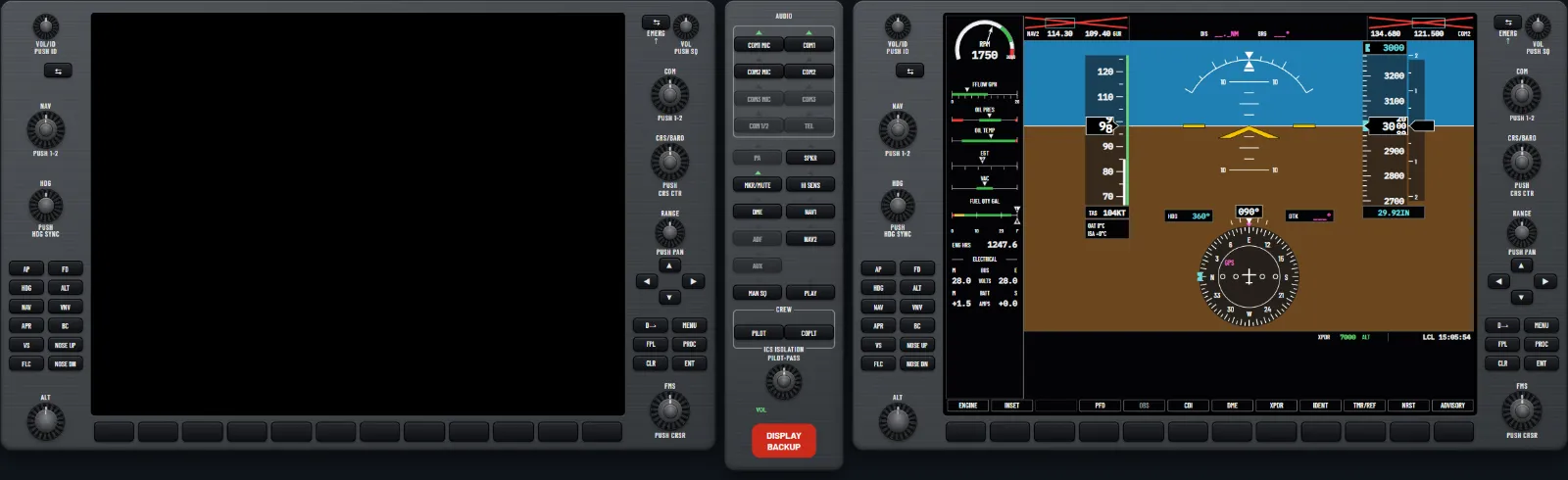
If the system does not notice a display problem, press the red DISPLAY BACKUP button on the audio panel. Press it again to go back.
Which NAV and COM you lose
Each of the two avionics units is paired with one display. When a display fails, its unit can no longer reach the surviving display, so the NAV and COM it supplies are flagged invalid there. The system description behind this guide does not number them, so read it off the screen: the crossed-out radios are the ones you have lost. In the trainer, a PFD failure crosses out NAV 1 and COM 1 and an MFD failure crosses out NAV 2 and COM 2. That pairing is the trainer’s own setup, so check your flight manual.
What the autopilot does
One effect is stated: when a display enters reversionary mode, a VNV path descent (VPTH) reverts to pitch hold (PIT), with VPTH and altitude capture armed again unless VNV is disabled. An active vertical direct-to is the exception. Nothing we work from says the autopilot disconnects because a display failed, or promises that it stays engaged, so read the mode strip.
Try it: “A display fails: reversionary mode”: fly on the MFD, then select it with DISPLAY BACKUP
Losing AHRS: heading and attitude
What you lose depends on which part of the AHRS has gone.
- Magnetometer failed. The attitude stays good. HDG is crossed out in red and the message reads HDG FAULT. Steer by the standby compass.
- CHECK ATTITUDE. A yellow box over the attitude, seen only with the autopilot engaged. It should clear in seconds. A real failure soon shows a red X.
- AHRS sensors failed. A red X and ATTITUDE FAIL across the attitude, with the heading lost too.
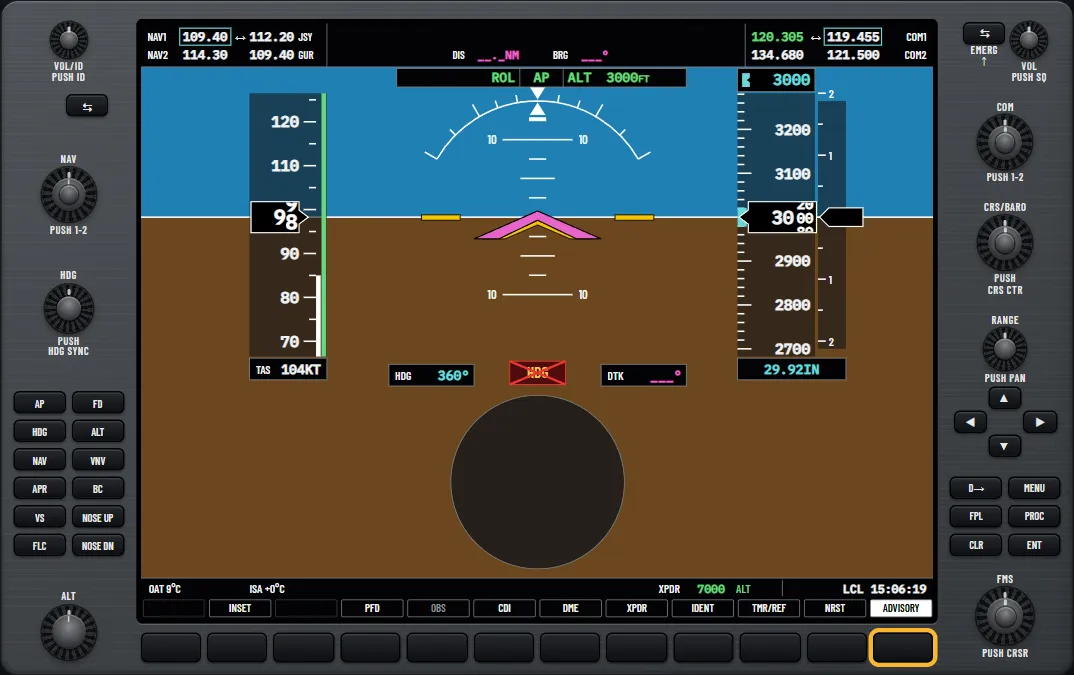
With attitude data invalid, the flight director is disabled and the autopilot disconnects by itself. AP flashes red with an aural alert until you acknowledge it with AP DISC. Take control. In the trainer’s 172S you then fly the standby attitude indicator, with the airspeed and altitude tapes that still work. That standby runs on vacuum, so check the vacuum gauge on the engine page is in the green. Your aircraft may differ.
Try it: “Losing heading, then attitude”: the red crosses, the disconnect and the standby instruments
If the autopilot itself fails
Autopilot faults show in a red box just below the mode strip. PTCH or ROLL means the autopilot is inoperative. AFCS means the autopilot and electric trim are unavailable, though the flight director may still work. PTRM is a pitch trim failure: with the autopilot engaged, take control and disengage it. The lesson walks through the sequence for a suspected malfunction, and your flight manual’s version is the one to use.
Try it: “Autopilot failures”: pitch trim, the roll axis, then the whole system
Losing air data
The air data computer feeds airspeed, altitude, vertical speed and outside air temperature. If it fails, the tapes carry red crosses with AIRSPEED FAIL, ALTITUDE FAIL and VERT SPEED FAIL. Use the standby airspeed indicator and altimeter, and hold a known attitude and power. The attitude stays good while the GPS does, because the AHRS substitutes GPS data for the missing airspeed. Lose air data and GPS together and attitude and heading go too, which leaves only the standby instruments.
Two autopilot rules apply. A flight director mode that loses the air data it needs drops to the default for that axis (PIT or ROL), and its annunciation flashes yellow. Invalid sensor data is also a listed cause of automatic disconnect, with the flashing red AP. Be ready for either.
GPS loss and dead reckoning
Each avionics unit has a GPS receiver. If one fails, the AHRS uses the other and a message tells you. Lose the GPS solution altogether in the en route or oceanic phase and the system reverts to dead reckoning (DR), estimating your position from the last fix, airspeed and heading. You will see:
- Yellow DR on the HSI and over the aircraft symbol on the map.
- GPS NAV LOST in the Alerts window, reached through the softkey reading ADVISORY.
- GPS-derived figures in yellow, and TAWS N/A because terrain alerting is disabled.
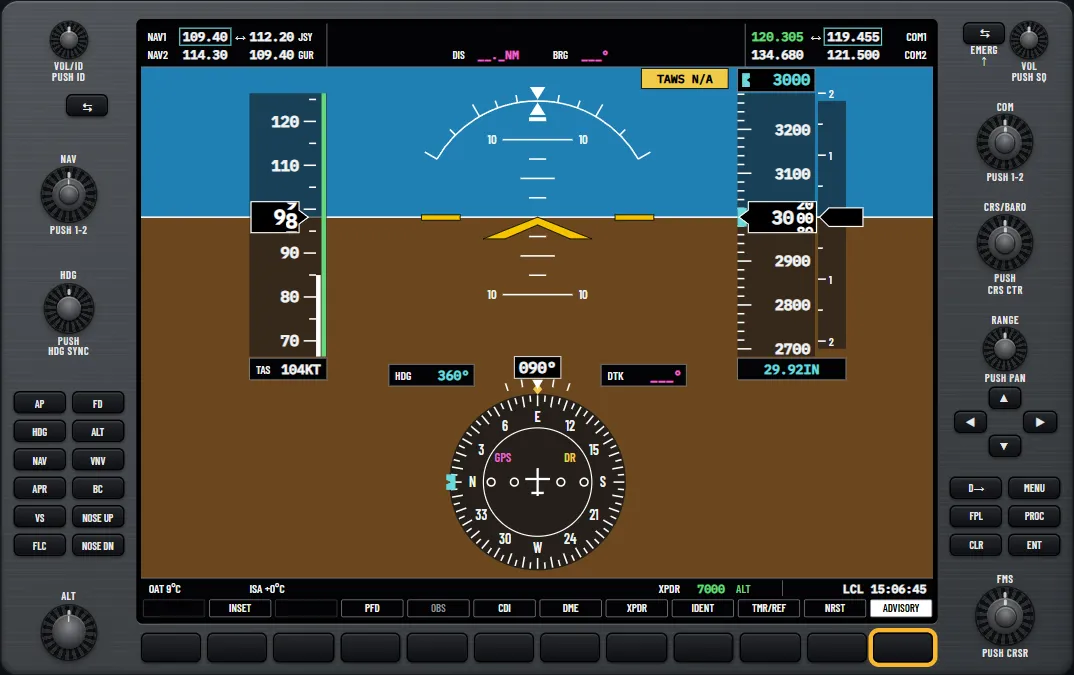
In other phases there is no DR: the map shows NO GPS POSITION. Yellow LOI on the HSI means integrity is not good enough for the phase of flight, which the RNAV and LPV guide covers.
The DR estimate gets worse with time and any change of wind, so never use it alone. If airspeed or heading has gone as well, do not use the path shown. Press CDI to change the source to the VOR and check its identifier. Normal navigation resumes by itself when the GPS returns. Attitude and heading carry on while the magnetometer and airspeed are valid.
The autopilot stays coupled to GPS for up to 20 minutes while the deviation is available, and the CDI is removed after 20 minutes in DR. A mode that loses the navigation data it steers by drops to ROL with the wings level, flashing yellow. Pressing CDI while NAV is active also drops it to ROL.
Try it: “GPS loss and dead reckoning”: recognise DR, read GPS NAV LOST and cross-check with the VOR
Radio failures
- COM tuning failure. The failed radio loads 121.500, the emergency frequency, by itself. A red X can cover it, depending on the failure. Carry on with the other radio: press COM2 MIC on the audio panel if COM 1 has failed.
- Stuck microphone. The COM MIC light flashes and the message COM1 PTT appears. The radio stops transmitting after 35 seconds. Press the push-to-talk switch again to free it.
- Audio panel failure. Your headset and microphone connect straight to COM 1, with no speaker audio.
- NAV failure. A red X covers the frequency. If it is your CDI source, the ends of the deviation bar carry red crosses, and a mode steering by it drops to its default.
- Whole avionics unit. You lose its GPS, NAV, COM and glideslope receivers. Either unit’s failure loses the autopilot and electric trim. Losing unit 1 also loses the flight director and the audio and voice alerts.
Try it: “A radio fails, and a stuck microphone”: 121.500 on COM 1, then a stuck key
Practising on the ground
These lessons are all in the glass cockpit trainer for the G1000, and its free play page has a Failures panel where you choose what to fail. The PFD guide shows the normal picture, and moving to a glass cockpit covers practising failures with your instructor.
Try it: “When things fail”: the PFD fails, then manual reversion, then a loss of attitude
Questions pilots ask
- What is reversionary mode on the G1000?
- The layout the remaining display takes when the other one fails: the flight instruments in the PFD’s format, with the engine instruments down the left. The system selects it by itself, and the red DISPLAY BACKUP button selects it by hand.
- Why are NAV and COM crossed out after a display failure?
- Each avionics unit is paired with one display. When a display fails, the unit behind it can no longer reach the other display, so its NAV and COM are flagged invalid there.
- What does a red X mean on the G1000?
- The window under it is not getting valid data from the unit that feeds it. At power-up some windows stay crossed out while the equipment starts, and all should be working within a minute.
- What does CHECK ATTITUDE mean?
- An AHRS monitor has seen something abnormal, in strong turbulence for example. It shows only with the autopilot engaged and should clear in seconds. A real failure soon brings a red X.
- What does DR mean on the HSI?
- Dead reckoning. The GPS solution has gone en route, so the system is estimating your position from the last fix, airspeed and heading. It must not be your only navigation.
- What does LOI mean?
- Loss of integrity: the GPS integrity is not good enough for the current phase of flight. It shows in yellow on the HSI, and INTEG OK shows in white for five seconds when integrity returns.
See it for yourself
Free and interactive, in your browser. No sign-up, nothing to install.
Sources and further reading
- FAA: Advanced Avionics Handbook (FAA-H-8083-6)
- FAA: Instrument Flying Handbook (FAA-H-8083-15B)
- SKYbrary: Glass Cockpit Avionics in Light Aircraft
A teaching aid, not an operating manual: the aircraft's flight manual, the published procedures and your instructor come first.
Unofficial training aid. Not affiliated with or endorsed by Garmin. Not for flight: always follow the approved pilot's guide and your instructor. Garmin and G1000 are trademarks of Garmin Ltd. or its subsidiaries.